


What's new in VideoManager Pro: Jonas shows the latest features
Communication that makes an impact
What's new in VideoManager Pro: Jonas shows the latest features
Why this walkthrough is worth watching, even if you use VideoManager Pro daily
Product updates are easy to miss when you work inside a tool every day. In this video Jonas goes through the changes in VideoManager Pro one screen at a time, and most of them target the work that quietly eats the most time: finding a video, organizing a library and getting metadata right.
Finding things faster
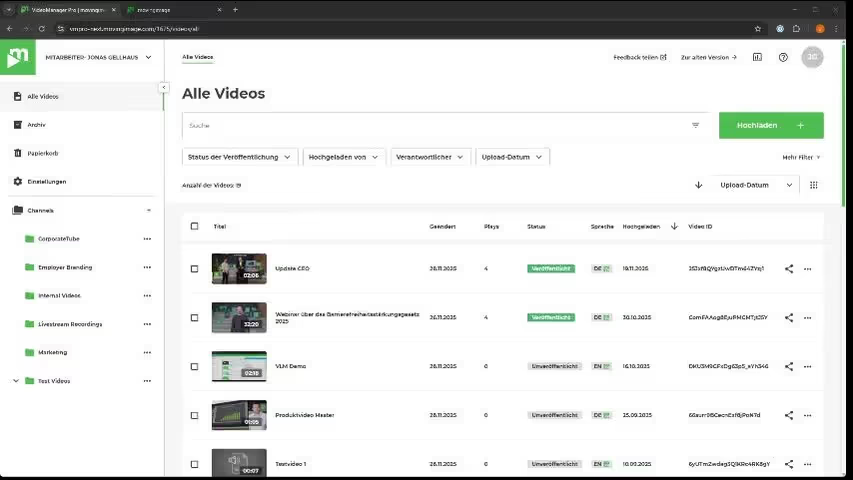
The first half is about the video list. You can now sort by clicking the column headers, with further criteria in the dropdown on the right, and change which columns are displayed. Standard filters sit directly under the search bar, covering publishing status, uploaded by, the person in charge and upload date, with more behind the More filters button. Items per page is adjustable beyond the default 25, which matters when you want to select a large batch at once. Search itself is faster and more consistent, and can now be restricted to specific fields such as file name, title and description, transcripts, subtitles or video ID. All of this works identically in the archive and the recycle bin.
Organizing and scheduling
Moving a sub-channel under a new parent now takes three clicks from the channel's context menu. Scheduled publishing is no longer limited to hourly intervals: you can set an exact time such as 20:05, and the same applies to scheduled unpublishing.
What the AI Assistant adds
Where it is licensed and activated, videos are transcribed automatically right after upload. On the video detail page the assistant suggests a title and description you apply with one click, and generates chapters with timestamps that you review in the chapter editor before saving, with thumbnails created per chapter automatically. Chapters can be shared directly, with the start time already pre-filled in the page link or embed code. Related videos were rebuilt too: you can now link individual videos, several channels, or any combination, instead of the single channel allowed before.
.avif)


.avif)
Our Speaker
Why this walkthrough is worth watching, even if you use VideoManager Pro daily
Product updates are easy to miss when you work inside a tool every day. In this video Jonas goes through the changes in VideoManager Pro one screen at a time, and most of them target the work that quietly eats the most time: finding a video, organizing a library and getting metadata right.
Finding things faster
The first half is about the video list. You can now sort by clicking the column headers, with further criteria in the dropdown on the right, and change which columns are displayed. Standard filters sit directly under the search bar, covering publishing status, uploaded by, the person in charge and upload date, with more behind the More filters button. Items per page is adjustable beyond the default 25, which matters when you want to select a large batch at once. Search itself is faster and more consistent, and can now be restricted to specific fields such as file name, title and description, transcripts, subtitles or video ID. All of this works identically in the archive and the recycle bin.
Organizing and scheduling
Moving a sub-channel under a new parent now takes three clicks from the channel's context menu. Scheduled publishing is no longer limited to hourly intervals: you can set an exact time such as 20:05, and the same applies to scheduled unpublishing.
What the AI Assistant adds
Where it is licensed and activated, videos are transcribed automatically right after upload. On the video detail page the assistant suggests a title and description you apply with one click, and generates chapters with timestamps that you review in the chapter editor before saving, with thumbnails created per chapter automatically. Chapters can be shared directly, with the start time already pre-filled in the page link or embed code. Related videos were rebuilt too: you can now link individual videos, several channels, or any combination, instead of the single channel allowed before.

Our Speakers
Voices from our customers





.avif)