

Published on
Teams Town Hall vs. LiveStream Pro: The Hidden Limits of Microsoft’s Solution (02/2026)
Communication that makes an impact
Teams Town Hall vs. LiveStream Pro: The Hidden Limits of Microsoft’s Solution (02/2026)
Introduction
Many businesses choose Microsoft Teams Town Hall because it integrates seamlessly into existing Microsoft environments and promises a simple solution for digital events. But is that enough? A closer look reveals significant limitations – from low streaming quality and lack of branding options to restricted interactivity and limited data protection features. In this article, we analyze where Teams Town Hall reaches its limits and demonstrate how Livestream Pro stands out as a professional alternative. Using seven key criteria, we compare both solutions and help you make the right choice for your company based on your specific needs.
Limitation #1: Limited control over streaming quality – Automation instead of professional fine-tuning
The quality of a livestream plays a key role in how professional and credible an event is perceived. Especially for corporate communications and external events, audiences expect a clear, smooth and reliable video experience. While Microsoft Teams Town Hall has made progress in this area, it still comes with conceptual limitations.
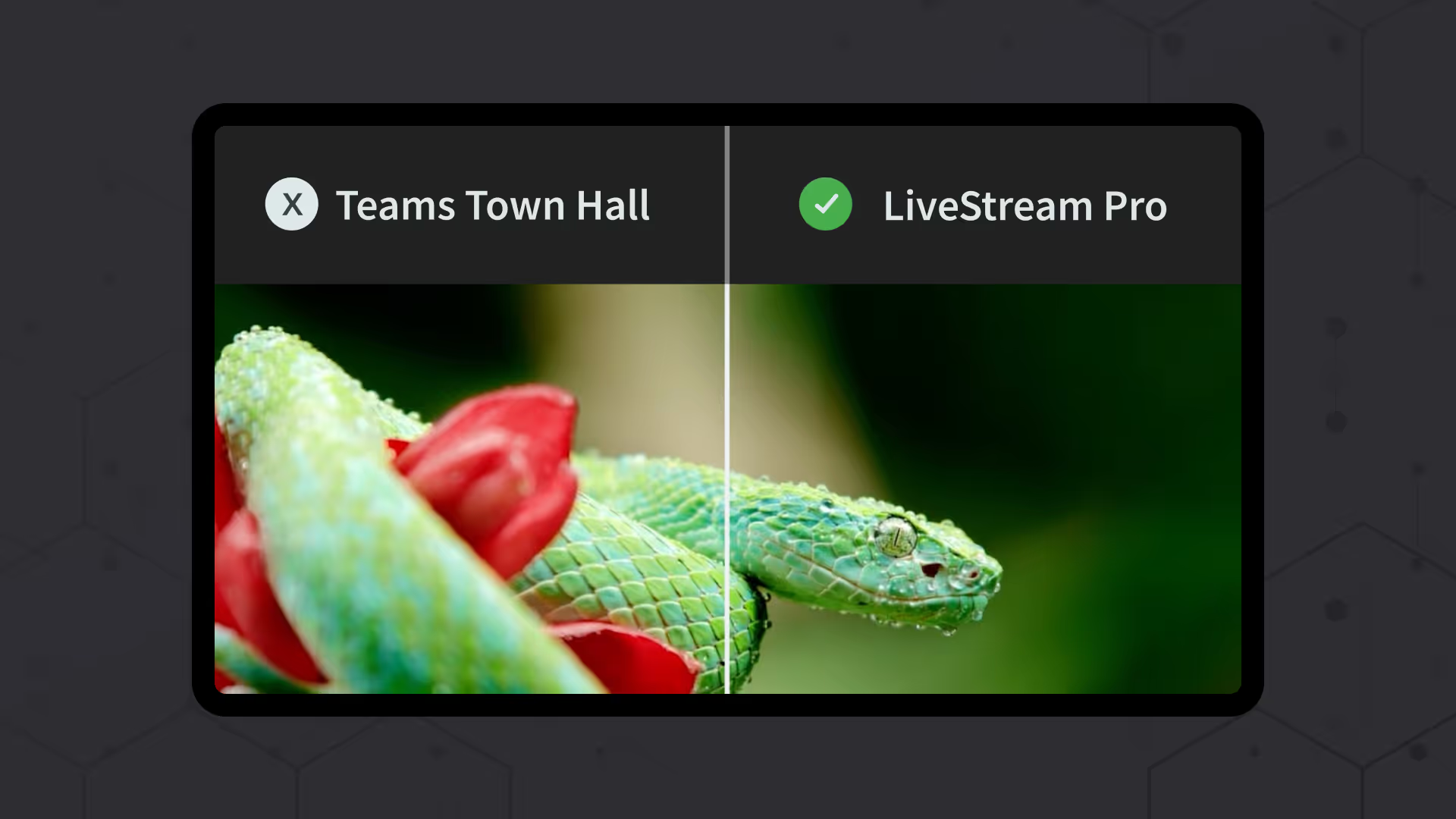
Teams Town Hall: 1080p, 30 FPS, automatic adjustment – but no user control
Microsoft Teams Town Hall now supports video resolutions of up to 1080p at 30 frames per second, meeting basic requirements for modern livestreams. However, control over streaming quality remains limited.
Viewers cannot manually select or switch between different quality levels. Instead, the stream quality is adjusted automatically by the system. While this can help maintain stability when bandwidth fluctuates, it leaves organizations without the ability to actively influence image quality, performance or streaming priorities.
In addition, the reduced frame rate of 30 FPS can result in less fluid motion, particularly during presentations, speaker close-ups or dynamic visual content. For professional-grade event productions, Teams Town Hall therefore remains a standardized solution with limited room for optimization.
LiveStream Pro: 1080p, 60 FPS, full control combined with intelligent automation
LiveStream Pro combines high technical quality with maximum control. Streams are delivered in 1080p Full HD with up to 60 frames per second, ensuring sharp visuals, smooth motion and a consistently professional appearance.
At the same time, LiveStream Pro offers adaptive streaming with multiple quality levels. The stream automatically adjusts to the viewer’s internet connection, ensuring stability without interruptions. Unlike Teams Town Hall, organizations retain full control over the streaming setup and delivery — a decisive advantage for high-stakes corporate events.
For companies that demand both high-quality video and professional control, LiveStream Pro is the more flexible and future-ready solution.
Limitation #2: Limited branding options – Your event stays Microsoft-branded
A livestream is more than just a broadcast – it is a direct representation of the company. A consistent brand identity ensures a professional appearance and strengthens recognition. However, this is exactly where Microsoft Teams Town Hall offers only very limited options.
Teams Town Hall: standard design with minimal customization
Companies using Teams Town Hall have only restricted options for adapting the design to their corporate branding. They can upload a banner and company logo and choose from one of nine predefined colors. Beyond that, the entire event design remains in Microsoft’s familiar look and feel.
Invitations, event pages, and the livestream itself clearly carry Microsoft’s branding. The standard templates leave little room for customization, making the event look like an ordinary Teams meeting rather than a high-quality, professional corporate event. For external events, product presentations, or customer gatherings, this lack of individuality can significantly diminish impact and perception.
LiveStream Pro: full CI/CD customization for your brand identity
With Livestream Pro, your company takes center stage – not the software. Every element of an event can be customized to create a seamless and professional brand experience.
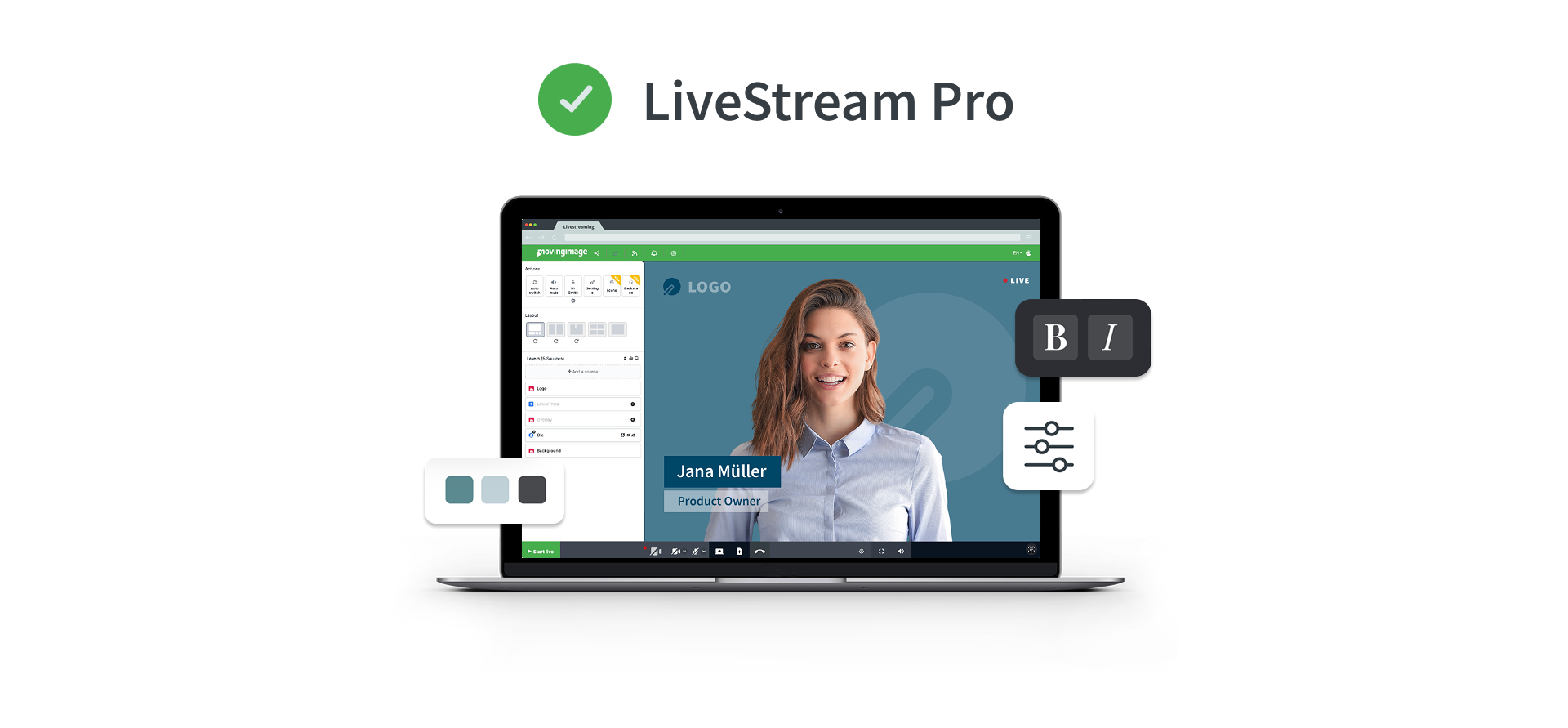
Colors, logos, fonts, and layouts can be tailored to match corporate design guidelines. The livestream player can be fully integrated into an existing website or event platform, ensuring that the event visually aligns with the brand.
Even invitation emails and event pages can be personalized and adapted to match the company’s style. Instead of generic standard templates, participants receive professionally designed communication that fits perfectly with the corporate identity.
Companies that prioritize a unique brand presence benefit from LiveStream Pro’s tailored solution, which puts their brand in the spotlight.
Limitation #3: Limited interactivity – Controlled participation instead of open exchange
A livestream should be more than a one-way broadcast. Successful virtual events thrive on interaction between speakers and participants. They enable dialogue, allow spontaneous reactions and drive engagement. This is where a key limitation of Microsoft Teams Town Hall becomes apparent.
Teams Town Hall: no open chat, interaction limited to controlled formats
Microsoft Teams Town Hall is primarily designed for tightly managed one-to-many communication. Participants cannot interact via an open live chat or exchange messages spontaneously with each other. Instead, engagement takes place through controlled formats such as a moderated Q&A, where questions must be submitted, reviewed and approved before becoming visible.
While Teams Town Hall now includes selected interactive elements such as polls or structured participation features, direct and informal interaction between participants remains limited. As a result, events often feel more regulated and less conversational — especially for formats that rely on dynamic discussion or real-time feedback.
LiveStream Pro: open interaction with professional moderation
LiveStream Pro delivers a significantly more interactive event experience. An open live chat allows participants to exchange ideas in real time, ask questions and actively engage with speakers and fellow viewers. At the same time, moderation tools ensure full control over the conversation, enabling high-quality and professional dialogue.
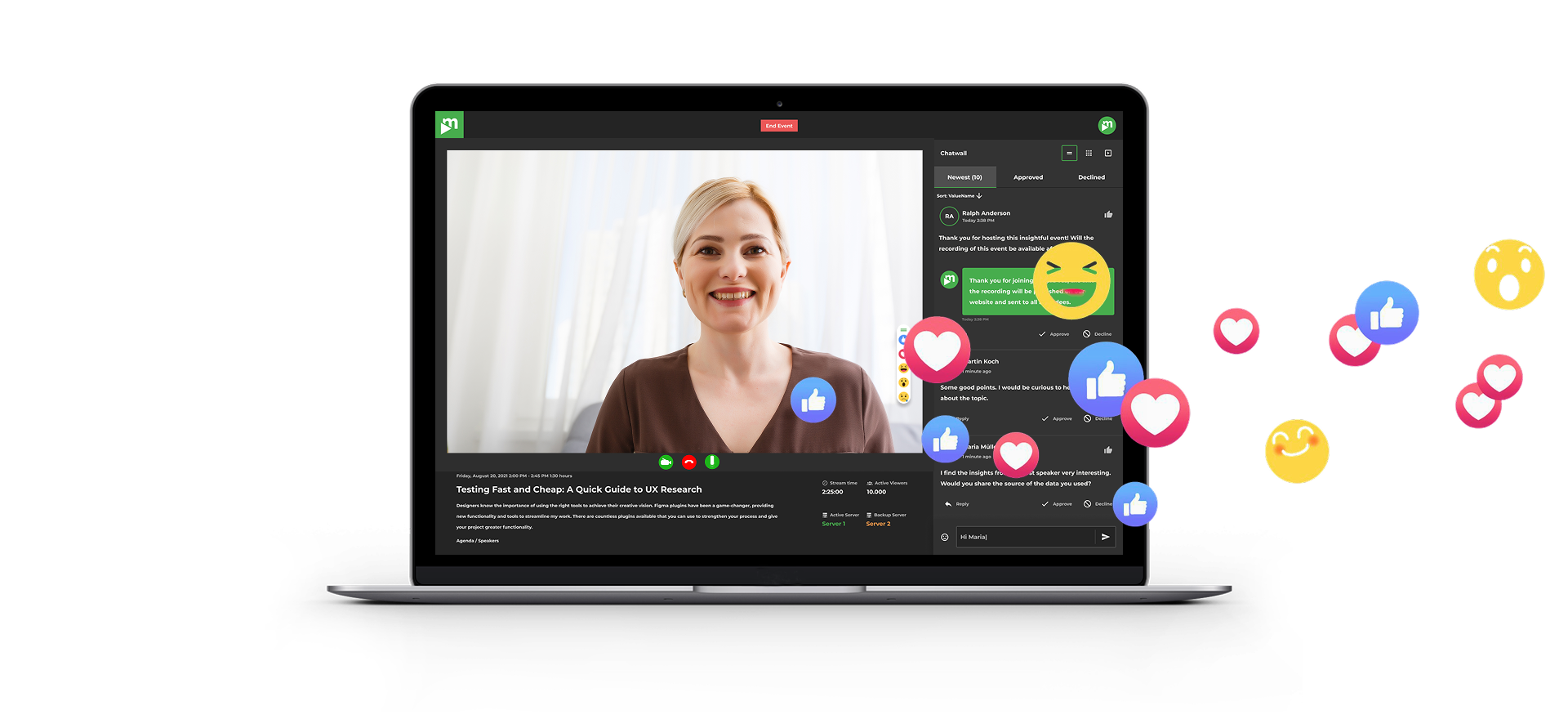
In addition to a classic Q&A, LiveStream Pro — in combination with Virtual Events — offers further interactive formats such as polls, live voting and reactions to actively involve the audience. Breakout rooms can be used for focused group discussions, workshops or training sessions within a livestream.
Gamification elements such as rankings or challenges further increase attention and participation. This transforms a passive audience into an engaged community — a decisive advantage for companies that want to deliver professional, dynamic digital events.
Limitation #4: Weak guest and participant management – Either open to all or inconvenient for guests
Not every event is meant for everyone equally. Companies often need to control who can participate, which content is visible to specific groups, and what permissions individual attendees have. A flexible and secure access management system is essential, but this is where Microsoft Teams Town Hall falls short.
Teams Town Hall: either internal or fully public – no granular control
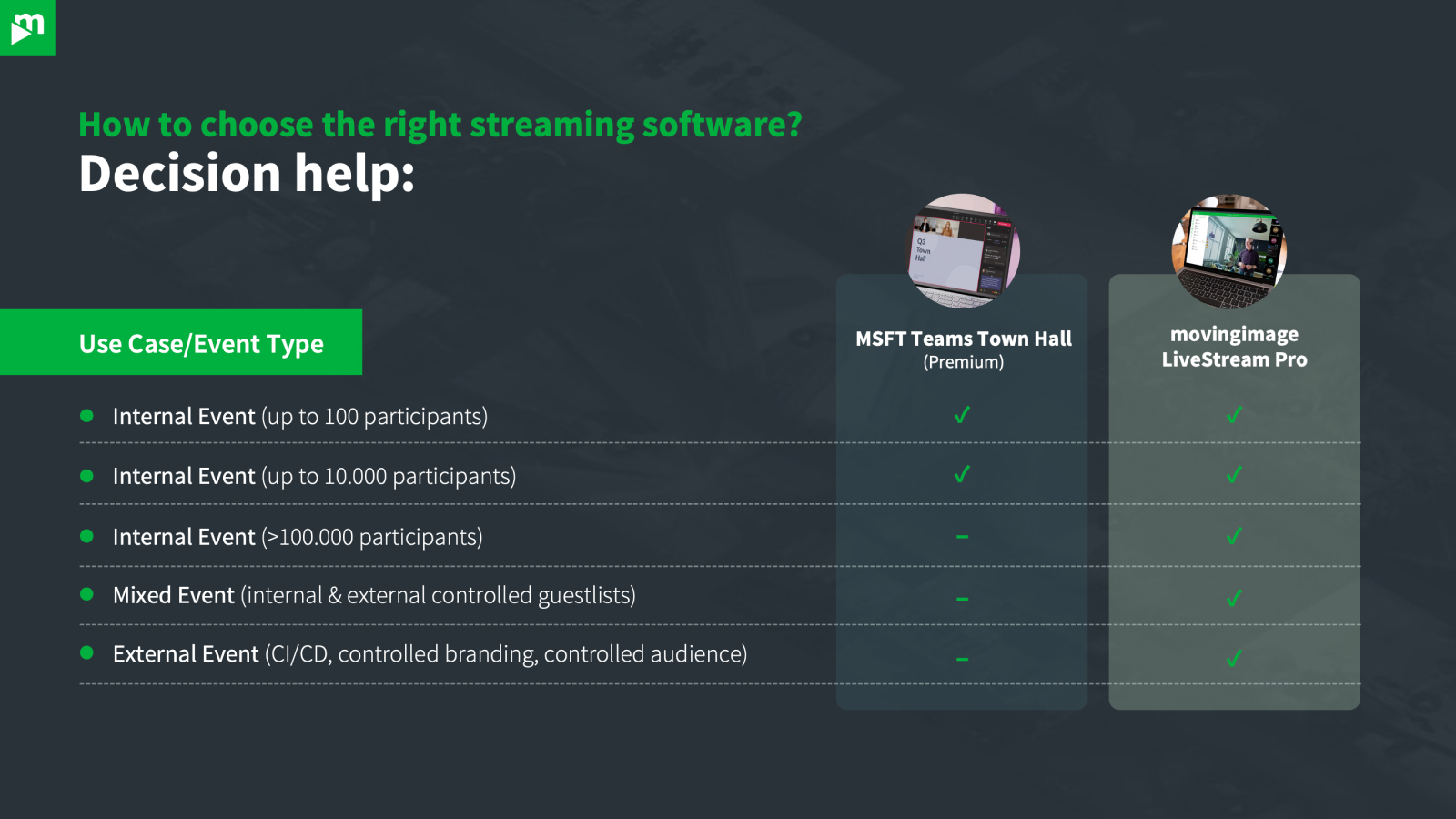
Teams Town Hall offers only two basic options for event access: it is either restricted to internal employees within the Microsoft environment or made fully public.
For companies that want to invite external guests, this creates a major limitation. External participants can only join via a public link, without any targeted access control. Once that link is shared, theoretically anyone can access the event—posing a significant security risk.
Moreover, there is no way to assign different permissions to different groups. This means all attendees see the same content and have the same rights, regardless of whether they are employees, partners, or external guests.
LiveStream Pro: detailed access and permission management
LiveStream Pro offers precise and secure management of participants and access rights. Companies can define exactly who is allowed to attend an event and, in combination with Virtual Events, control which content is visible to different groups.
Through granular permission settings in Virtual Events, various access levels can be assigned—for example, for internal employees, external guests, or VIP participants. With SSO (Single Sign-On) integration, companies can securely and conveniently manage employee access.
Additional security features such as token authentication and custom roles allow events to be selectively opened or restricted for specific groups. This ensures that companies reach exactly the right audience—without unnecessary risks or administrative challenges.
Limitation #5: Data protection and security – Microsoft remains a black box
Data protection and IT security are critical concerns for companies, especially in Europe. Strict regulations like the GDPR require full transparency regarding where and how data is processed. Companies must ensure that sensitive information remains protected and is stored exclusively on servers that comply with their internal compliance policies. However, Microsoft Teams Town Hall offers only limited control in this area.
Teams Town Hall: reliance on Microsoft servers with uncertain data control
Companies using Teams Town Hall must fully rely on Microsoft’s infrastructure. The exact location of the servers where event data is stored is often unclear and depends on the company’s global data centers.
For European businesses, this poses a serious challenge, as processing personal data outside the EU can be problematic. Additionally, there are no security features specifically designed to meet European data protection standards. Companies looking to host GDPR-compliant events have limited options with Teams Town Hall to fully meet their compliance requirements.
LiveStream Pro: GDPR-compliant security with European servers
LiveStream Pro provides companies with full control over their event data while ensuring the highest security standards. All data is hosted in Europe in compliance with GDPR, allowing companies to always know where their information is stored and processed.
Furthermore, LiveStream Pro, in combination with Virtual Events, enables precise control over access and participant logs. Companies can view detailed records and track exactly who has accessed which content.
With advanced security features such as token authentication and custom access restrictions, companies can effectively protect sensitive data. This ensures that livestreams and events are not only professional but also fully aligned with internal security policies and legal requirements.
.avif)


.avif)
Limitation #6: Limited analytics – Restricted insights instead of actionable event data
Detailed analytics are essential for measuring the success of a livestream and continuously improving future events. Organizations need to understand how viewers engage with content, where attention drops and which elements perform best. While Microsoft Teams Town Hall now provides basic reporting, it still falls short compared to professional livestreaming solutions.
Teams Town Hall: basic post-event reporting
Microsoft Teams Town Hall offers basic analytics after the event, including key metrics such as total number of viewers, average viewing duration and a timeline showing how audience numbers changed throughout the event. This graph provides a general overview of viewer activity — but only after the event has ended, not in real time.
Deeper insights into viewer behavior remain limited. Organizations cannot fully analyze which content resonated most, how engagement evolved during the session or how interactive elements were used in detail. As a result, analytics remain largely descriptive and offer only limited guidance for strategic optimization.
LiveStream Pro: advanced analytics for continuous improvement
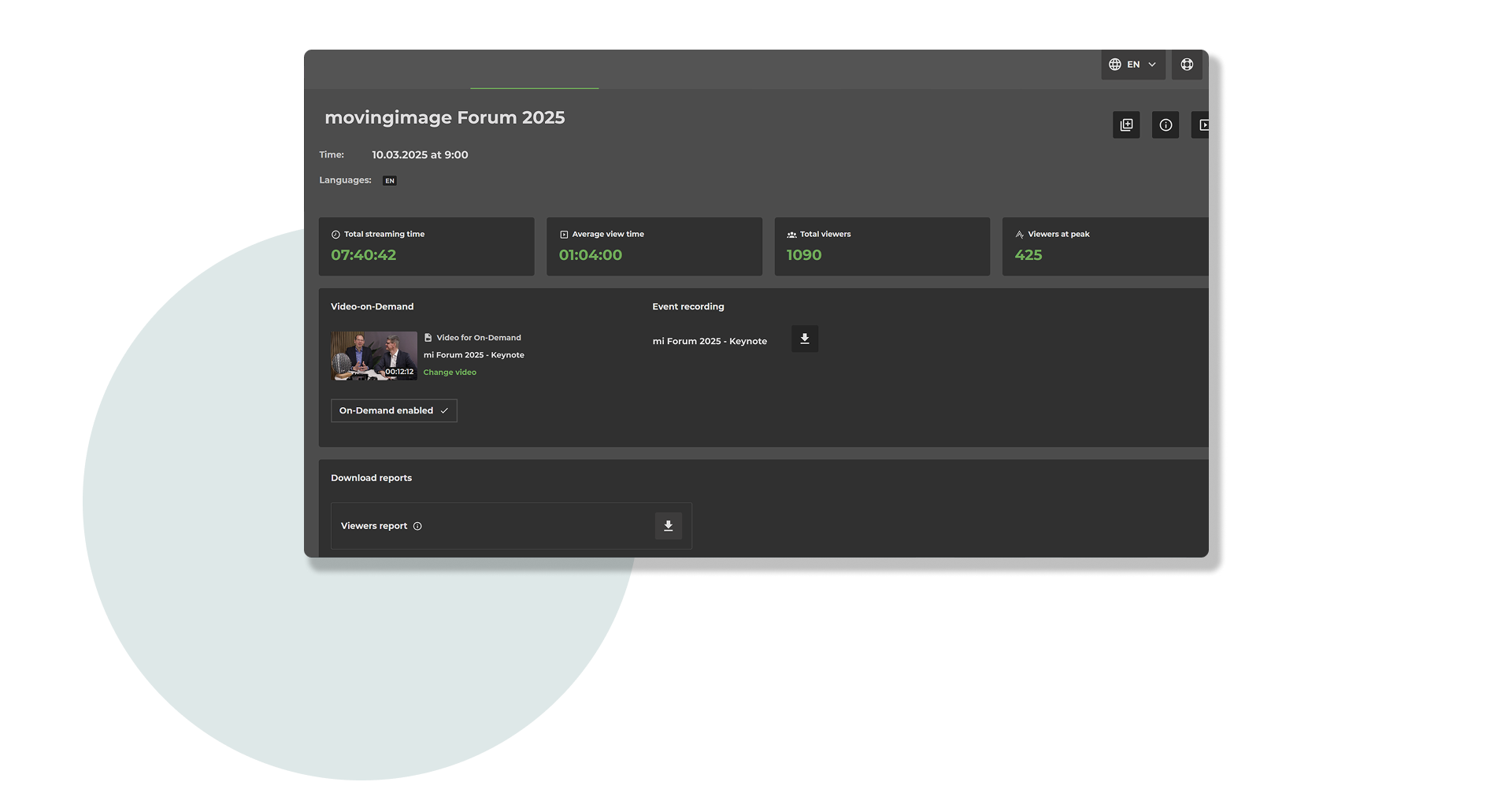
With LiveStream Pro, organizations gain access to more comprehensive analytics designed to support long-term optimization. After the event, detailed reports go far beyond basic attendance metrics and include insights into viewing behavior, engagement levels and the use of interactive features such as chats or polls.
These insights enable organizations to better understand their audience, refine content strategies and continuously improve the livestream experience. Instead of relying on surface-level data, teams can base decisions on meaningful insights that support professional, scalable event communication.
Limitation #7: Lack of event support – No professional point of contact
A livestream event must run smoothly. Technical issues or unexpected challenges can severely impact the viewer experience and jeopardize the success of the event. That’s why it is crucial to have professional support available when needed. However, Microsoft Teams Town Hall does not offer specialized event support, leaving companies to handle problems on their own.
Teams Town Hall: standard support without event expertise
Teams Town Hall only provides general Microsoft support, which covers a wide range of Microsoft products. Specific questions related to livestreams or event management are not given priority, and there are no dedicated contacts for event organizers.
Additionally, there is no personalized assistance or troubleshooting during the event. If technical problems arise—such as transmission failures, connectivity issues, or difficulties with participant management—companies are often left to resolve them on their own. For business-critical events, this presents a significant risk.

LiveStream Pro: dedicated support from event professionals
With LiveStream Pro, companies gain direct access to experienced streaming and event specialists. The support team assists customers from planning to execution and post-event analysis.
For technical questions or unexpected issues, a dedicated support team is available, specializing in livestream events. This ensures that problems can be resolved quickly, guaranteeing a seamless broadcast.
Whether it’s personalized advice on optimal streaming configurations, assistance with setup, or technical troubleshooting during the event—LiveStream Pro ensures that every event is professionally managed and runs without disruption.
Conclusion: Teams Town Hall or LiveStream Pro – Which solution is right for you?
Companies that regularly host livestreams for internal or external audiences need a solution that is not only technically reliable but also customizable, interactive, and secure.
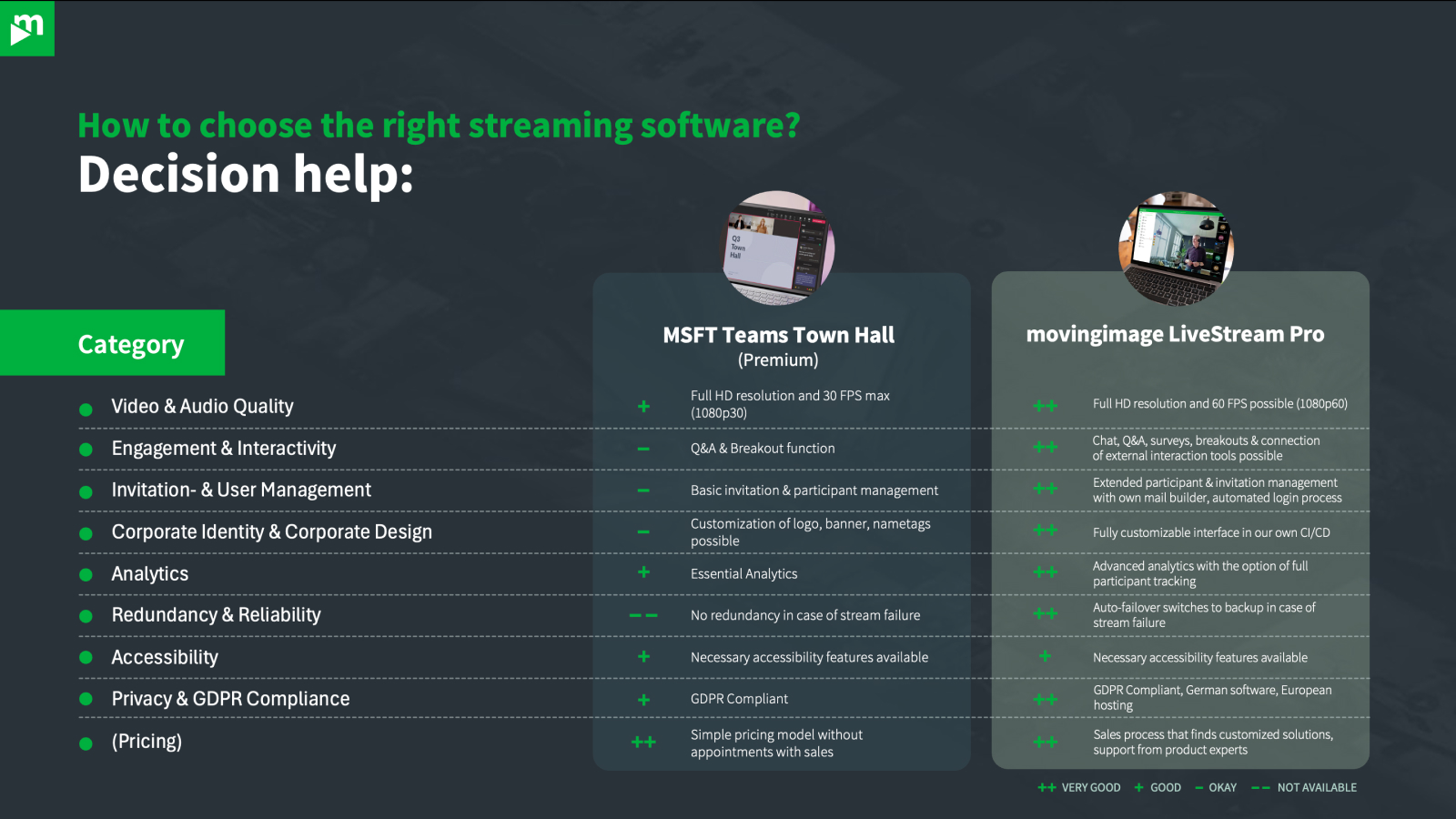
Microsoft Teams Town Hall is suitable for simple internal meetings where basic functionality is sufficient. However, when events require a more professional setup—whether through fluid video quality, custom branding, interactive features, or precise participant management—the platform quickly reaches its limits.
LiveStream Pro, on the other hand, provides a comprehensive solution specifically designed for high-quality corporate events. Companies benefit from top-tier streaming quality, full CI/CD customization, extensive interaction features, and GDPR-compliant security. Additionally, dedicated support from event professionals ensures that every event runs smoothly.
For those seeking a high-quality, secure, and customizable livestream experience, LiveStream Pro is the clear winner.
Our Speaker
Introduction
Many businesses choose Microsoft Teams Town Hall because it integrates seamlessly into existing Microsoft environments and promises a simple solution for digital events. But is that enough? A closer look reveals significant limitations – from low streaming quality and lack of branding options to restricted interactivity and limited data protection features. In this article, we analyze where Teams Town Hall reaches its limits and demonstrate how Livestream Pro stands out as a professional alternative. Using seven key criteria, we compare both solutions and help you make the right choice for your company based on your specific needs.
Limitation #1: Limited control over streaming quality – Automation instead of professional fine-tuning
The quality of a livestream plays a key role in how professional and credible an event is perceived. Especially for corporate communications and external events, audiences expect a clear, smooth and reliable video experience. While Microsoft Teams Town Hall has made progress in this area, it still comes with conceptual limitations.
Teams Town Hall: 1080p, 30 FPS, automatic adjustment – but no user control
Microsoft Teams Town Hall now supports video resolutions of up to 1080p at 30 frames per second, meeting basic requirements for modern livestreams. However, control over streaming quality remains limited.
Viewers cannot manually select or switch between different quality levels. Instead, the stream quality is adjusted automatically by the system. While this can help maintain stability when bandwidth fluctuates, it leaves organizations without the ability to actively influence image quality, performance or streaming priorities.
In addition, the reduced frame rate of 30 FPS can result in less fluid motion, particularly during presentations, speaker close-ups or dynamic visual content. For professional-grade event productions, Teams Town Hall therefore remains a standardized solution with limited room for optimization.
LiveStream Pro: 1080p, 60 FPS, full control combined with intelligent automation
LiveStream Pro combines high technical quality with maximum control. Streams are delivered in 1080p Full HD with up to 60 frames per second, ensuring sharp visuals, smooth motion and a consistently professional appearance.
At the same time, LiveStream Pro offers adaptive streaming with multiple quality levels. The stream automatically adjusts to the viewer’s internet connection, ensuring stability without interruptions. Unlike Teams Town Hall, organizations retain full control over the streaming setup and delivery — a decisive advantage for high-stakes corporate events.
For companies that demand both high-quality video and professional control, LiveStream Pro is the more flexible and future-ready solution.
Limitation #2: Limited branding options – Your event stays Microsoft-branded
A livestream is more than just a broadcast – it is a direct representation of the company. A consistent brand identity ensures a professional appearance and strengthens recognition. However, this is exactly where Microsoft Teams Town Hall offers only very limited options.
Teams Town Hall: standard design with minimal customization
Companies using Teams Town Hall have only restricted options for adapting the design to their corporate branding. They can upload a banner and company logo and choose from one of nine predefined colors. Beyond that, the entire event design remains in Microsoft’s familiar look and feel.
Invitations, event pages, and the livestream itself clearly carry Microsoft’s branding. The standard templates leave little room for customization, making the event look like an ordinary Teams meeting rather than a high-quality, professional corporate event. For external events, product presentations, or customer gatherings, this lack of individuality can significantly diminish impact and perception.
LiveStream Pro: full CI/CD customization for your brand identity
With Livestream Pro, your company takes center stage – not the software. Every element of an event can be customized to create a seamless and professional brand experience.
Colors, logos, fonts, and layouts can be tailored to match corporate design guidelines. The livestream player can be fully integrated into an existing website or event platform, ensuring that the event visually aligns with the brand.
Even invitation emails and event pages can be personalized and adapted to match the company’s style. Instead of generic standard templates, participants receive professionally designed communication that fits perfectly with the corporate identity.
Companies that prioritize a unique brand presence benefit from LiveStream Pro’s tailored solution, which puts their brand in the spotlight.
Limitation #3: Limited interactivity – Controlled participation instead of open exchange
A livestream should be more than a one-way broadcast. Successful virtual events thrive on interaction between speakers and participants. They enable dialogue, allow spontaneous reactions and drive engagement. This is where a key limitation of Microsoft Teams Town Hall becomes apparent.
Teams Town Hall: no open chat, interaction limited to controlled formats
Microsoft Teams Town Hall is primarily designed for tightly managed one-to-many communication. Participants cannot interact via an open live chat or exchange messages spontaneously with each other. Instead, engagement takes place through controlled formats such as a moderated Q&A, where questions must be submitted, reviewed and approved before becoming visible.
While Teams Town Hall now includes selected interactive elements such as polls or structured participation features, direct and informal interaction between participants remains limited. As a result, events often feel more regulated and less conversational — especially for formats that rely on dynamic discussion or real-time feedback.
LiveStream Pro: open interaction with professional moderation
LiveStream Pro delivers a significantly more interactive event experience. An open live chat allows participants to exchange ideas in real time, ask questions and actively engage with speakers and fellow viewers. At the same time, moderation tools ensure full control over the conversation, enabling high-quality and professional dialogue.
In addition to a classic Q&A, LiveStream Pro — in combination with Virtual Events — offers further interactive formats such as polls, live voting and reactions to actively involve the audience. Breakout rooms can be used for focused group discussions, workshops or training sessions within a livestream.
Gamification elements such as rankings or challenges further increase attention and participation. This transforms a passive audience into an engaged community — a decisive advantage for companies that want to deliver professional, dynamic digital events.
Limitation #4: Weak guest and participant management – Either open to all or inconvenient for guests
Not every event is meant for everyone equally. Companies often need to control who can participate, which content is visible to specific groups, and what permissions individual attendees have. A flexible and secure access management system is essential, but this is where Microsoft Teams Town Hall falls short.
Teams Town Hall: either internal or fully public – no granular control
Teams Town Hall offers only two basic options for event access: it is either restricted to internal employees within the Microsoft environment or made fully public.
For companies that want to invite external guests, this creates a major limitation. External participants can only join via a public link, without any targeted access control. Once that link is shared, theoretically anyone can access the event—posing a significant security risk.
Moreover, there is no way to assign different permissions to different groups. This means all attendees see the same content and have the same rights, regardless of whether they are employees, partners, or external guests.
LiveStream Pro: detailed access and permission management
LiveStream Pro offers precise and secure management of participants and access rights. Companies can define exactly who is allowed to attend an event and, in combination with Virtual Events, control which content is visible to different groups.
Through granular permission settings in Virtual Events, various access levels can be assigned—for example, for internal employees, external guests, or VIP participants. With SSO (Single Sign-On) integration, companies can securely and conveniently manage employee access.
Additional security features such as token authentication and custom roles allow events to be selectively opened or restricted for specific groups. This ensures that companies reach exactly the right audience—without unnecessary risks or administrative challenges.
Limitation #5: Data protection and security – Microsoft remains a black box
Data protection and IT security are critical concerns for companies, especially in Europe. Strict regulations like the GDPR require full transparency regarding where and how data is processed. Companies must ensure that sensitive information remains protected and is stored exclusively on servers that comply with their internal compliance policies. However, Microsoft Teams Town Hall offers only limited control in this area.
Teams Town Hall: reliance on Microsoft servers with uncertain data control
Companies using Teams Town Hall must fully rely on Microsoft’s infrastructure. The exact location of the servers where event data is stored is often unclear and depends on the company’s global data centers.
For European businesses, this poses a serious challenge, as processing personal data outside the EU can be problematic. Additionally, there are no security features specifically designed to meet European data protection standards. Companies looking to host GDPR-compliant events have limited options with Teams Town Hall to fully meet their compliance requirements.
LiveStream Pro: GDPR-compliant security with European servers
LiveStream Pro provides companies with full control over their event data while ensuring the highest security standards. All data is hosted in Europe in compliance with GDPR, allowing companies to always know where their information is stored and processed.
Furthermore, LiveStream Pro, in combination with Virtual Events, enables precise control over access and participant logs. Companies can view detailed records and track exactly who has accessed which content.
With advanced security features such as token authentication and custom access restrictions, companies can effectively protect sensitive data. This ensures that livestreams and events are not only professional but also fully aligned with internal security policies and legal requirements.

Limitation #6: Limited analytics – Restricted insights instead of actionable event data
Detailed analytics are essential for measuring the success of a livestream and continuously improving future events. Organizations need to understand how viewers engage with content, where attention drops and which elements perform best. While Microsoft Teams Town Hall now provides basic reporting, it still falls short compared to professional livestreaming solutions.
Teams Town Hall: basic post-event reporting
Microsoft Teams Town Hall offers basic analytics after the event, including key metrics such as total number of viewers, average viewing duration and a timeline showing how audience numbers changed throughout the event. This graph provides a general overview of viewer activity — but only after the event has ended, not in real time.
Deeper insights into viewer behavior remain limited. Organizations cannot fully analyze which content resonated most, how engagement evolved during the session or how interactive elements were used in detail. As a result, analytics remain largely descriptive and offer only limited guidance for strategic optimization.
LiveStream Pro: advanced analytics for continuous improvement
With LiveStream Pro, organizations gain access to more comprehensive analytics designed to support long-term optimization. After the event, detailed reports go far beyond basic attendance metrics and include insights into viewing behavior, engagement levels and the use of interactive features such as chats or polls.
These insights enable organizations to better understand their audience, refine content strategies and continuously improve the livestream experience. Instead of relying on surface-level data, teams can base decisions on meaningful insights that support professional, scalable event communication.
Limitation #7: Lack of event support – No professional point of contact
A livestream event must run smoothly. Technical issues or unexpected challenges can severely impact the viewer experience and jeopardize the success of the event. That’s why it is crucial to have professional support available when needed. However, Microsoft Teams Town Hall does not offer specialized event support, leaving companies to handle problems on their own.
Teams Town Hall: standard support without event expertise
Teams Town Hall only provides general Microsoft support, which covers a wide range of Microsoft products. Specific questions related to livestreams or event management are not given priority, and there are no dedicated contacts for event organizers.
Additionally, there is no personalized assistance or troubleshooting during the event. If technical problems arise—such as transmission failures, connectivity issues, or difficulties with participant management—companies are often left to resolve them on their own. For business-critical events, this presents a significant risk.
LiveStream Pro: dedicated support from event professionals
With LiveStream Pro, companies gain direct access to experienced streaming and event specialists. The support team assists customers from planning to execution and post-event analysis.
For technical questions or unexpected issues, a dedicated support team is available, specializing in livestream events. This ensures that problems can be resolved quickly, guaranteeing a seamless broadcast.
Whether it’s personalized advice on optimal streaming configurations, assistance with setup, or technical troubleshooting during the event—LiveStream Pro ensures that every event is professionally managed and runs without disruption.
Conclusion: Teams Town Hall or LiveStream Pro – Which solution is right for you?
Companies that regularly host livestreams for internal or external audiences need a solution that is not only technically reliable but also customizable, interactive, and secure.
Microsoft Teams Town Hall is suitable for simple internal meetings where basic functionality is sufficient. However, when events require a more professional setup—whether through fluid video quality, custom branding, interactive features, or precise participant management—the platform quickly reaches its limits.
LiveStream Pro, on the other hand, provides a comprehensive solution specifically designed for high-quality corporate events. Companies benefit from top-tier streaming quality, full CI/CD customization, extensive interaction features, and GDPR-compliant security. Additionally, dedicated support from event professionals ensures that every event runs smoothly.
For those seeking a high-quality, secure, and customizable livestream experience, LiveStream Pro is the clear winner.
Our Speakers
Voices from our customers





.avif)