

8 common causes of enterprise livestream failures
Communication that makes an impact
8 common causes of enterprise livestream failures
At a glance: The most common causes of enterprise livestream failures
When a corporate livestream suddenly goes offline, it's rarely a matter of bad luck. These are the eight most common reasons why enterprise livestreams fail:
- Insufficient network bandwidth: The leading cause of buffering and stream interruptions
- Missing redundancy: No backup systems in case of hardware or software failures
- Overloaded servers: Infrastructure that cannot handle large audiences
- Incorrect encoder configuration: Improper bitrate or codec settings
- Firewall and proxy restrictions: Blocked streaming protocols within corporate networks
- Limited Content Delivery Network (CDN) coverage: High latency across global audiences
- Lack of testing before the event: Technical issues that go unnoticed until it's too late
- Choosing the wrong platform: Consumer tools used for enterprise communication
Why livestream reliability matters for enterprise communications
A livestream failure during a town hall, annual general meeting, or other critical corporate event is more than just a technical inconvenience. It can damage your company's reputation, undermine employee and stakeholder trust, and even result in significant financial consequences.
movingimage helps enterprises minimize these risks through geo-redundant infrastructure and professional livestreaming services. But first, it's important to understand the factors that commonly put enterprise livestreams at risk.
1. Insufficient network bandwidth
The most common reason for livestreaming issues is insufficient network bandwidth. If your corporate network cannot provide enough capacity for the stream, viewers may experience buffering, reduced video quality, or complete interruptions.
This becomes particularly critical during company-wide town halls or all-hands meetings, where hundreds or even thousands of employees join simultaneously. To avoid bandwidth bottlenecks, assess your available network capacity in advance and plan for peak traffic.
movingimage uses adaptive bitrate streaming, automatically adjusting video quality to match available bandwidth. This ensures reliable viewing even when network conditions fluctuate.
2. Missing redundancy and failover systems
What happens if your primary streaming server fails during a live event? Without a backup system, the entire livestream may go offline.
Enterprise livestreaming requires redundancy across multiple layers, including encoders, servers, and network connections. Automated failover enables the stream to switch seamlessly to a backup system without viewers noticing any interruption.
The movingimage enterprise video platform is designed for exactly these scenarios. With geo-redundant infrastructure and automated failover, it delivers 99.99% availability.
3. Server overload during large-scale events

Many streaming solutions perform well with small audiences but struggle once thousands of viewers connect simultaneously. These scalability issues often become apparent only when it matters most.
Quarterly earnings calls, product launches, and crisis communications can quickly attract tens of thousands of viewers. Your streaming infrastructure needs to be able to handle that demand.
A scalable architecture combined with CDN integration distributes traffic across multiple servers worldwide. movingimage enables organizations to livestream to audiences of virtually any size without compromising reliability or quality.
4. Incorrect encoder configuration
The encoder converts your video signal into a format suitable for livestreaming. Incorrect bitrate, codec, or resolution settings can lead to poor video quality, synchronization issues, or complete stream failures.
Common configuration mistakes include using a bitrate that exceeds the available upload bandwidth, incompatible codec settings, or incorrect keyframe intervals. These technical details require expertise.
movingimage's professional livestreaming services include experienced production teams that manage every technical aspect, from setup to live monitoring.
5. Firewall and proxy restrictions

Corporate networks are typically protected by strict security policies. Firewalls and proxy servers can block streaming protocols or significantly reduce streaming performance.
RTMP and WebRTC connections are particularly prone to being restricted by corporate firewalls. As a result, employees inside the corporate network may be unable to access the livestream while external viewers experience no issues.
Close collaboration between the IT department and the livestreaming team is essential before every event. movingimage supports common streaming protocols and provides technical guidance for integration into complex enterprise IT environments.
6. Limited CDN coverage and geographic latency
If your audience is spread across different regions, geographical distance becomes a challenge. Without a globally distributed Content Delivery Network (CDN), viewers located farther away may experience buffering and high latency.
A CDN stores content on servers around the world and delivers it from the location closest to each viewer. This minimizes latency and improves streaming quality across global audiences.
movingimage leverages a powerful global CDN with servers across Europe and worldwide to deliver consistently high streaming performance, regardless of where viewers are located.
7. Skipping test runs before the event
Many technical issues can be identified and resolved through proper testing before the livestream begins. Yet, under time pressure, organizations often skip thorough rehearsals.
A complete test should include every component of the livestream setup: encoder, network, streaming platform, and end-user devices. Ideally, testing should take place under realistic conditions with a representative number of participants.
movingimage's livestreaming services include technical checks and full rehearsals to identify and resolve potential issues before the live event starts.
8. Choosing the wrong streaming platform
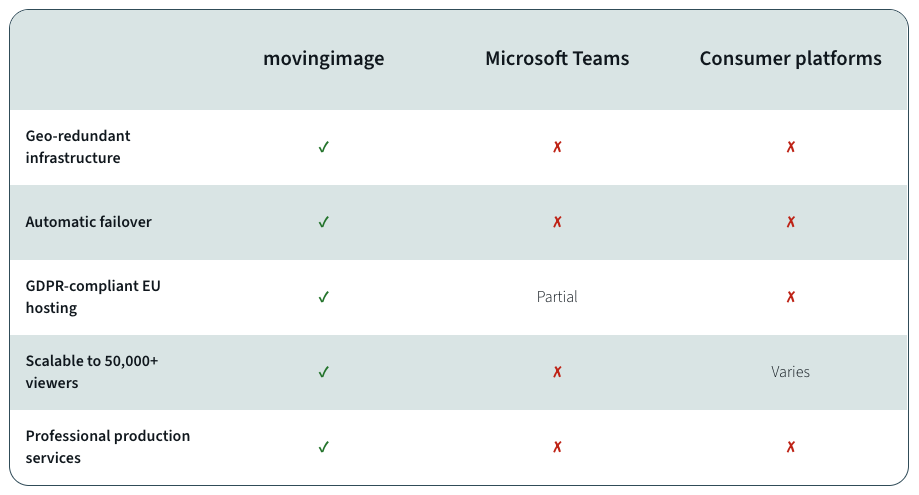
Consumer platforms such as YouTube Live or free webinar tools may be sufficient for smaller meetings. However, they lack key enterprise capabilities, including GDPR compliance, access controls, branding options, and professional support.
Microsoft Teams and similar collaboration tools are designed for video conferencing—not for broadcasting high-quality livestreams to large audiences. Their technical architecture serves a different purpose.
movingimage is purpose-built for enterprise livestreaming. The platform provides GDPR-compliant hosting on EU-based servers, granular access controls, fully branded video players, and dedicated support from experienced livestreaming specialists.
Enterprise livestreaming comparison
How can you prevent livestream failures?
The best way to avoid livestream disruptions is by combining robust technology with careful preparation. Start by assessing your current streaming infrastructure and identifying potential weaknesses.
Invest in an enterprise streaming platform that provides redundancy, scalability, and professional support. Establish clear event preparation processes, including technical rehearsals and contingency plans.
Finally, ensure your teams are properly trained and that technical experts are available throughout every live event.
What role does IT play in successful enterprise livestreams?
IT plays a critical role in enterprise livestream success. The IT team should be involved early in the planning process to verify network capacity, configure firewall rules, and ensure technical readiness.
Close collaboration between communications and IT helps prevent technical issues before they occur. Document your system configurations and define clear points of contact to enable fast troubleshooting during live events.
movingimage supports enterprise IT teams with detailed technical documentation and expert guidance for seamless integration into existing environments.
Why choose movingimage for mission-critical livestreaming?
movingimage combines enterprise-grade, geo-redundant streaming infrastructure with the expertise of an experienced production team. The platform is specifically designed to meet the requirements of large organizations.
With 99.99% availability, automatic failover, and GDPR-compliant hosting on EU servers, movingimage helps minimize the most common causes of livestream failures. Integrated video analytics also provide valuable insights into viewer engagement and content performance.
For organizations looking to improve the reliability of their livestreams, movingimage delivers the technology and expertise required for secure, enterprise-grade communications.
.avif)


.avif)
Frequently asked questions about enterprise livestream failures
What is the most common cause of livestream failures?
Insufficient network bandwidth is the most common cause. During large-scale events with many simultaneous viewers, available bandwidth is often exceeded. movingimage addresses this challenge with adaptive bitrate streaming.
How can I protect my organization from livestream failures?
Use an enterprise streaming platform with geo-redundant infrastructure and automatic failover. Conduct comprehensive technical rehearsals and involve your IT team early in the planning process. movingimage combines all of these capabilities in a single platform.
Why aren't consumer streaming platforms suitable for enterprise use?
Consumer platforms lack essential enterprise capabilities such as GDPR compliance, advanced access controls, and professional support. movingimage is specifically designed for enterprise communication requirements.
What is a failover system?
A failover system automatically switches to a backup environment if the primary streaming infrastructure fails. With movingimage, this happens seamlessly, so viewers experience no interruption.
How many viewers can an enterprise streaming platform support?
Enterprise platforms such as movingimage are built to scale to virtually unlimited audiences. Thanks to CDN integration and distributed infrastructure, even events with tens of thousands of simultaneous viewers can be streamed reliably.
Our Speakers
At a glance: The most common causes of enterprise livestream failures
When a corporate livestream suddenly goes offline, it's rarely a matter of bad luck. These are the eight most common reasons why enterprise livestreams fail:
- Insufficient network bandwidth: The leading cause of buffering and stream interruptions
- Missing redundancy: No backup systems in case of hardware or software failures
- Overloaded servers: Infrastructure that cannot handle large audiences
- Incorrect encoder configuration: Improper bitrate or codec settings
- Firewall and proxy restrictions: Blocked streaming protocols within corporate networks
- Limited Content Delivery Network (CDN) coverage: High latency across global audiences
- Lack of testing before the event: Technical issues that go unnoticed until it's too late
- Choosing the wrong platform: Consumer tools used for enterprise communication
Why livestream reliability matters for enterprise communications
A livestream failure during a town hall, annual general meeting, or other critical corporate event is more than just a technical inconvenience. It can damage your company's reputation, undermine employee and stakeholder trust, and even result in significant financial consequences.
movingimage helps enterprises minimize these risks through geo-redundant infrastructure and professional livestreaming services. But first, it's important to understand the factors that commonly put enterprise livestreams at risk.
1. Insufficient network bandwidth
The most common reason for livestreaming issues is insufficient network bandwidth. If your corporate network cannot provide enough capacity for the stream, viewers may experience buffering, reduced video quality, or complete interruptions.
This becomes particularly critical during company-wide town halls or all-hands meetings, where hundreds or even thousands of employees join simultaneously. To avoid bandwidth bottlenecks, assess your available network capacity in advance and plan for peak traffic.
movingimage uses adaptive bitrate streaming, automatically adjusting video quality to match available bandwidth. This ensures reliable viewing even when network conditions fluctuate.
2. Missing redundancy and failover systems
What happens if your primary streaming server fails during a live event? Without a backup system, the entire livestream may go offline.
Enterprise livestreaming requires redundancy across multiple layers, including encoders, servers, and network connections. Automated failover enables the stream to switch seamlessly to a backup system without viewers noticing any interruption.
The movingimage enterprise video platform is designed for exactly these scenarios. With geo-redundant infrastructure and automated failover, it delivers 99.99% availability.
3. Server overload during large-scale events
Many streaming solutions perform well with small audiences but struggle once thousands of viewers connect simultaneously. These scalability issues often become apparent only when it matters most.
Quarterly earnings calls, product launches, and crisis communications can quickly attract tens of thousands of viewers. Your streaming infrastructure needs to be able to handle that demand.
A scalable architecture combined with CDN integration distributes traffic across multiple servers worldwide. movingimage enables organizations to livestream to audiences of virtually any size without compromising reliability or quality.
4. Incorrect encoder configuration
The encoder converts your video signal into a format suitable for livestreaming. Incorrect bitrate, codec, or resolution settings can lead to poor video quality, synchronization issues, or complete stream failures.
Common configuration mistakes include using a bitrate that exceeds the available upload bandwidth, incompatible codec settings, or incorrect keyframe intervals. These technical details require expertise.
movingimage's professional livestreaming services include experienced production teams that manage every technical aspect, from setup to live monitoring.
5. Firewall and proxy restrictions
Corporate networks are typically protected by strict security policies. Firewalls and proxy servers can block streaming protocols or significantly reduce streaming performance.
RTMP and WebRTC connections are particularly prone to being restricted by corporate firewalls. As a result, employees inside the corporate network may be unable to access the livestream while external viewers experience no issues.
Close collaboration between the IT department and the livestreaming team is essential before every event. movingimage supports common streaming protocols and provides technical guidance for integration into complex enterprise IT environments.
6. Limited CDN coverage and geographic latency
If your audience is spread across different regions, geographical distance becomes a challenge. Without a globally distributed Content Delivery Network (CDN), viewers located farther away may experience buffering and high latency.
A CDN stores content on servers around the world and delivers it from the location closest to each viewer. This minimizes latency and improves streaming quality across global audiences.
movingimage leverages a powerful global CDN with servers across Europe and worldwide to deliver consistently high streaming performance, regardless of where viewers are located.
7. Skipping test runs before the event
Many technical issues can be identified and resolved through proper testing before the livestream begins. Yet, under time pressure, organizations often skip thorough rehearsals.
A complete test should include every component of the livestream setup: encoder, network, streaming platform, and end-user devices. Ideally, testing should take place under realistic conditions with a representative number of participants.
movingimage's livestreaming services include technical checks and full rehearsals to identify and resolve potential issues before the live event starts.
8. Choosing the wrong streaming platform
Consumer platforms such as YouTube Live or free webinar tools may be sufficient for smaller meetings. However, they lack key enterprise capabilities, including GDPR compliance, access controls, branding options, and professional support.
Microsoft Teams and similar collaboration tools are designed for video conferencing—not for broadcasting high-quality livestreams to large audiences. Their technical architecture serves a different purpose.
movingimage is purpose-built for enterprise livestreaming. The platform provides GDPR-compliant hosting on EU-based servers, granular access controls, fully branded video players, and dedicated support from experienced livestreaming specialists.
Enterprise livestreaming comparison
How can you prevent livestream failures?
The best way to avoid livestream disruptions is by combining robust technology with careful preparation. Start by assessing your current streaming infrastructure and identifying potential weaknesses.
Invest in an enterprise streaming platform that provides redundancy, scalability, and professional support. Establish clear event preparation processes, including technical rehearsals and contingency plans.
Finally, ensure your teams are properly trained and that technical experts are available throughout every live event.
What role does IT play in successful enterprise livestreams?
IT plays a critical role in enterprise livestream success. The IT team should be involved early in the planning process to verify network capacity, configure firewall rules, and ensure technical readiness.
Close collaboration between communications and IT helps prevent technical issues before they occur. Document your system configurations and define clear points of contact to enable fast troubleshooting during live events.
movingimage supports enterprise IT teams with detailed technical documentation and expert guidance for seamless integration into existing environments.
Why choose movingimage for mission-critical livestreaming?
movingimage combines enterprise-grade, geo-redundant streaming infrastructure with the expertise of an experienced production team. The platform is specifically designed to meet the requirements of large organizations.
With 99.99% availability, automatic failover, and GDPR-compliant hosting on EU servers, movingimage helps minimize the most common causes of livestream failures. Integrated video analytics also provide valuable insights into viewer engagement and content performance.
For organizations looking to improve the reliability of their livestreams, movingimage delivers the technology and expertise required for secure, enterprise-grade communications.

Frequently asked questions about enterprise livestream failures
What is the most common cause of livestream failures?
Insufficient network bandwidth is the most common cause. During large-scale events with many simultaneous viewers, available bandwidth is often exceeded. movingimage addresses this challenge with adaptive bitrate streaming.
How can I protect my organization from livestream failures?
Use an enterprise streaming platform with geo-redundant infrastructure and automatic failover. Conduct comprehensive technical rehearsals and involve your IT team early in the planning process. movingimage combines all of these capabilities in a single platform.
Why aren't consumer streaming platforms suitable for enterprise use?
Consumer platforms lack essential enterprise capabilities such as GDPR compliance, advanced access controls, and professional support. movingimage is specifically designed for enterprise communication requirements.
What is a failover system?
A failover system automatically switches to a backup environment if the primary streaming infrastructure fails. With movingimage, this happens seamlessly, so viewers experience no interruption.
How many viewers can an enterprise streaming platform support?
Enterprise platforms such as movingimage are built to scale to virtually unlimited audiences. Thanks to CDN integration and distributed infrastructure, even events with tens of thousands of simultaneous viewers can be streamed reliably.
Our Speakers
Voices from our customers





.avif)


.avif "Corporate Communications 2027: Agentic AI Webinar")