


movingimage VideoManager Pro
Communication that makes an impact
movingimage VideoManager Pro
Why this flyer is a useful reference
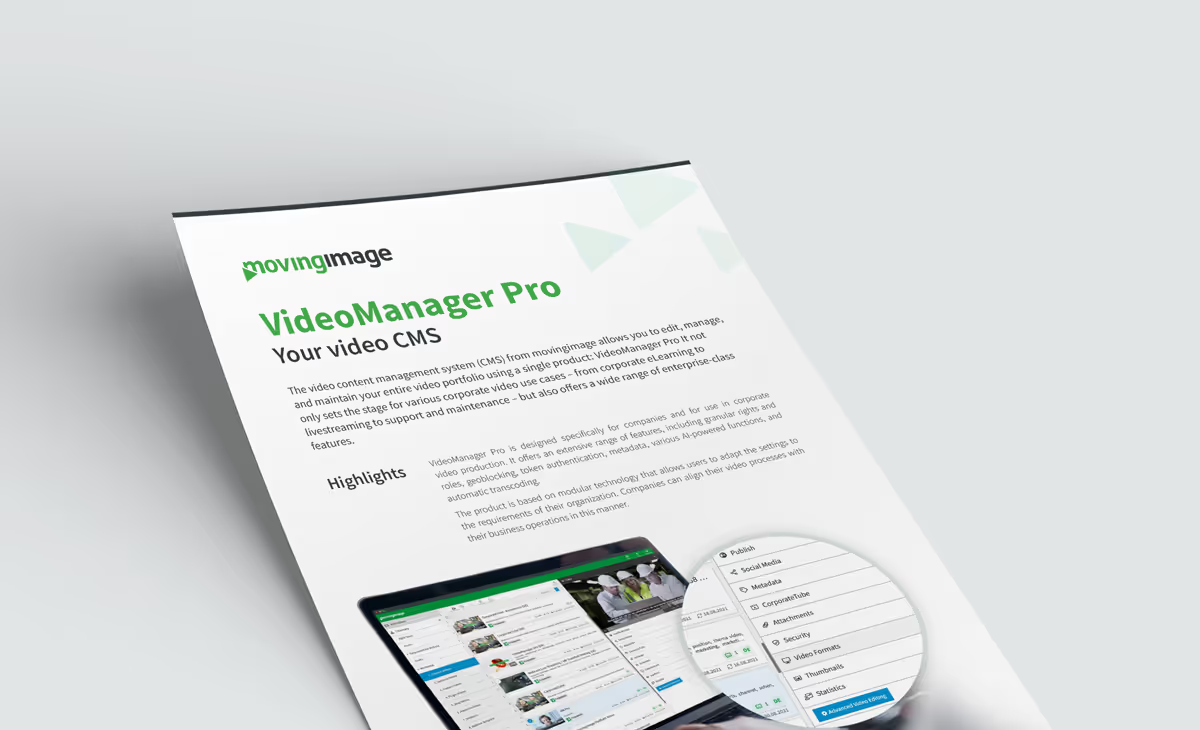
Video tends to accumulate across an organization: files on shared drives, clips on external platforms, and no single view of what exists or who is allowed to see it. This flyer describes how VideoManager Pro consolidates all of that into one video content management system, covering hosting, editing, streaming and transcoding in a single product.
What the platform covers
The document walks through the feature set: metadata editing, video splitting and merging, automatic transcoding into the required formats, thumbnail generation, publishing through embed links, distribution to social networks including YouTube, and built-in statistics. AI features such as automated speech recognition for subtitles are covered as part of everyday production rather than as an add-on.
Governance and security
This is the section most enterprise readers turn to first. Granular rights and roles management, access profiles, token authentication, geoblocking and deletion timers determine who can see which video, from where, and for how long. If you operate under retention rules or regional restrictions, the flyer shows how those are enforced inside the platform instead of in a spreadsheet.
Which use cases it serves
Corporate eLearning, livestreaming, and support and maintenance content are the scenarios described, all running on the same modular architecture. That matters for total cost: adding a new use case means configuring an existing platform rather than procuring another tool. Download the flyer if you are mapping your current video landscape or preparing a consolidation business case.
.avif)


.avif)
Our Speakers
Why this flyer is a useful reference
Video tends to accumulate across an organization: files on shared drives, clips on external platforms, and no single view of what exists or who is allowed to see it. This flyer describes how VideoManager Pro consolidates all of that into one video content management system, covering hosting, editing, streaming and transcoding in a single product.
What the platform covers
The document walks through the feature set: metadata editing, video splitting and merging, automatic transcoding into the required formats, thumbnail generation, publishing through embed links, distribution to social networks including YouTube, and built-in statistics. AI features such as automated speech recognition for subtitles are covered as part of everyday production rather than as an add-on.
Governance and security
This is the section most enterprise readers turn to first. Granular rights and roles management, access profiles, token authentication, geoblocking and deletion timers determine who can see which video, from where, and for how long. If you operate under retention rules or regional restrictions, the flyer shows how those are enforced inside the platform instead of in a spreadsheet.
Which use cases it serves
Corporate eLearning, livestreaming, and support and maintenance content are the scenarios described, all running on the same modular architecture. That matters for total cost: adding a new use case means configuring an existing platform rather than procuring another tool. Download the flyer if you are mapping your current video landscape or preparing a consolidation business case.

Our Speakers
Voices from our customers





.avif)

.avif "Corporate Communications 2027: Agentic AI Webinar")